Ingredients enter with quantity and cost
The storekeeper records the quantity, unit price and warehouse. Item movements retain a reference to the receipt.
The result: traceable stockFeed and inventory software for beef and dairy farms
Connect inventory, feed mixes and barn feeding. Record daily work on mobile and review feed cost per head, kilo gained or litre of milk from your farm records.
Your farm at a glance
Feeding and inventory overviewIssue variance: −50 kg
From store to barn
Quick walkthrough · 1 min 45 sec
A short tour of the real screens: from receiving ingredients in the warehouse, to mixing, to issuing feed to each barn, all the way to feed cost and KPIs.
Arabic narration with English and Arabic captions. Recorded on a demo farm with synthetic data.
See what you will work with
Choose a step to see a real Makayeel screen and how it fits your farm workflow. All captures use a test account and sample data.
See each item by warehouse, with quantity, average cost and stock value. Start a receipt or stocktake and open the item movement history.
These captures show part of the Arabic app interface with synthetic test data. Figures illustrate the screens and do not promise results for your farm.
Open full screen capture (new tab)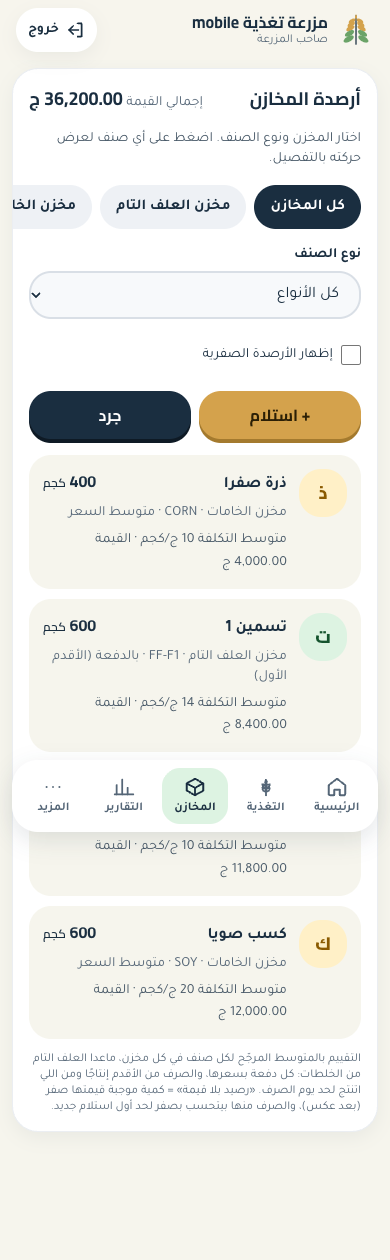
One workflow instead of scattered records
The storekeeper records the quantity, unit price and warehouse. Item movements retain a reference to the receipt.
The result: traceable stockProduce a mix from farm ingredients or issue ready feed, then record the barn and meal.
The result: barn-linked issuesReview actual issues, the plan and feed costs. Recorded weights or milk yield complete the indicators for your farm activity.
The result: costs from recorded workFollow the whole cycle
Every movement counts. Follow quantities and costs together, from ingredients received to feed consumed in each barn.
Track every item by warehouse. Record receipts, transfers, wastage and stocktakes, with item movements you can review.
Build feed formulas and estimate cost per tonne using warehouse ingredient costs. Production orders connect ingredients consumed with the resulting feed batch and its cost.
Record barn feed issues, set a daily allowance per head and compare the plan with actual issues to review quantity and cost variances.
Numbers for daily decisions
Record feeding, head counts, weights or milk yield. Review barn indicators based on the data available.
Track feed conversion, average daily gain and feed cost per kilo gained using recorded weights and head movements.
Connect recorded milk yield with feeding costs to follow feed cost per litre and daily milk yield per head.
A day with Makayeel
Define warehouses, items and barns, then record opening stock.
Receive ingredients, produce feed mixes and issue feed to barns.
Follow consumption, planned versus actual feeding and barn performance.
A clear role for each person
An Arabic interface for mobile and desktop, with access based on user role. Each farm has separate data, and supervisors record quantities without viewing costs.
Review stock, feed costs, plan variances and barn indicators without gathering scattered records.
Record receipts, issues, transfers and stocktakes, and review item movements in the selected warehouse.
Record feeding, weights, milk and head movements from mobile, within the permissions of their role.
Before your first record
If your workflow has specific requirements, we can review them together in the demo.
Track barns, head counts, feeding, weights and milk yield. Beef or dairy indicators depend on the barn type and the data recorded.
Yes. The app runs in a browser on mobile and desktop. You can record and review according to your role. An internet connection is required.
Record receipts and issues of ready feed, or define a formula and run a mixing order that consumes ingredients and adds the resulting feed batch at its cost.
The indicators cover feed costs from recorded inventory movements. Feed cost per kilo gained excludes the purchase price of the animal and labour. Makayeel focuses on feeding and inventory rather than full farm accounting.
Access depends on the user role. Owners can review costs; supervisors record and review quantities without seeing costs. We review team roles when setting up the account.
Request a demo and tell us about your activity, warehouses, barns and team. We review fit and opening data, and agree account setup and subscription details before you begin.
A practical demo for your workflow
Tell us about your farm. We will walk through stock, feeding and costs, then explain account setup and subscription details before you start.